 TenutoWeb (Version 3) Tutorials
 At times, you may find duplicate teachers under "Users / teachers > Manage teachers". Duplicate teachers are two teacher records with the same name, but different emails, that refer to the same person.
How do duplicate teachers happen?
Duplicate teachers may be created when we import MTNA data. If the teacher existed in the TenutoWeb system with a different email, a new record may be created when importing MTNA membership data that contains the same teacher with a different email, since TenutoWeb generally uses emails to identify unique teachers.
Duplicate teachers may also happen due to human error. For example, a chair may create a teacher that already existed in the system. While TenutoWeb will warn the chair if the email already exists, at times a chair may actually make a typo in the email, resulting on a new teacher being created.
Another way to detect duplicate teachers
Most TenutoWeb system include the option "Show dupicate teachers" within the "Users / teachers" menu item. This option will list teacher records that have the same names, but different emails. Warning: It's possible that two different teachers share the same name. So, some of the teachers listed there may be "false duplicates".
What to do if you find duplicate teachers
In many cases, it's OK to have duplication, if the teacher always uses the same email to log in. The duplicate record will never be used. In that case, this can be ignored.
However, there may be issues if a teacher with a duplicate record chooses to use the email NOT listed with MTNA. Next year, when we import the membership list, the teacher record with the email not listed by MTNA will be marked as "non member", since he/she doesn't exists in the MTNA list with that email. So, you want to:
- Talk to the teacher and ask which email they wish to use to log in to TenutoWeb
- If that email is not the one they have with MTNA, advise the teacher to either use the one MTNA has, or to contact MTNA to change the email. It's always best if the MTNA and the TenutoWeb emails match
Once you find out which email they want to use, you can use "Users / Teachers > Show duplicate teachers" to merge the two teachers.
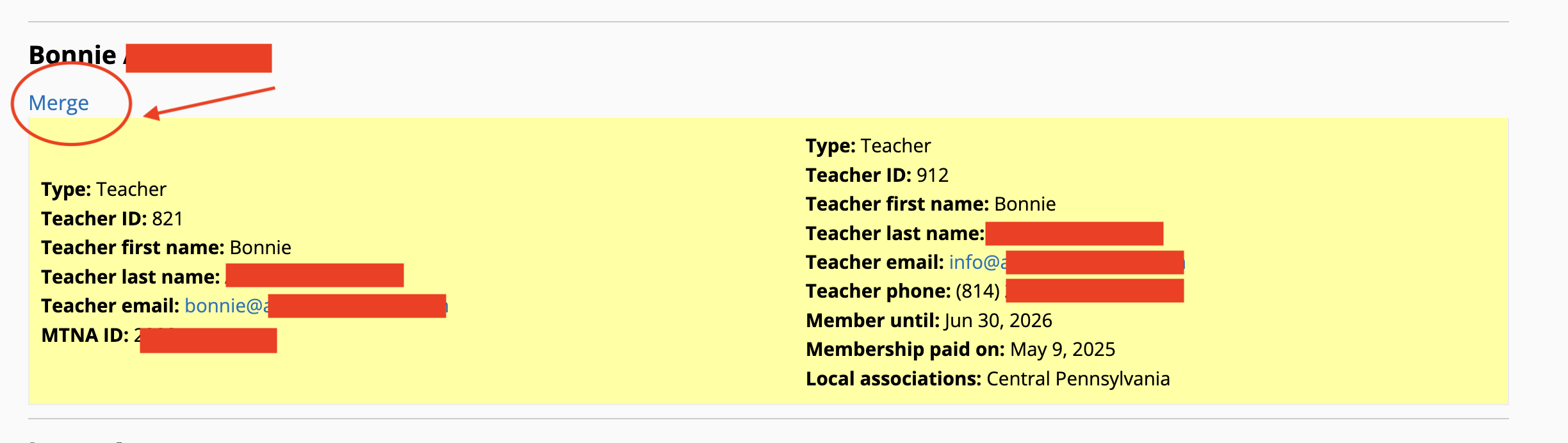
When you merge the two records, TenutoWeb will ask you which email you want to preserve. Pick the one that the teacher prefers, hopefully, the one listed with MTNA. Any student records and exiting registrations that existed with the "other" teacher will be transferred and merged.
Deleting users
After you've merged the teachers, only one teacher under that name will be listed. However, a user record will still remain with TenutoWeb. This user needs to be removed.
- Go to "Users / teachers > Manage users"
- Do a search by the email that the teacher does NOT want to use with TenutoWeb
- Click "edit"
- Click "Cancel account"
- Choose "Delete the account and its content" and click "Cancel account" again
This will remove the user account, so that in the future, the teacher will not be able to log in with that email by mistake.
If in doubt, don't hesitate to contact me! It's always better to be safe than sorry!